Web Development Team
Whether you’re having a problem in LiveWhale (the content management system behind our lclark.edu website) or just curious about how you can improve your website, you’ve come to the right place. We are here to help you.
We build the tools to help you tell your stories on the L&C website.
Web Development Team


LiveWhale How-Tos
LiveWhale separates content into different access groups. So the undergraduate English department content, for instance, is edited separately from the environmental law program content, which is separate from the graduate school’s admissions content, and so on.
Editors need to be granted access by the New Media team to edit content beyond their default group.
Not everyone has access to edit in LiveWhale. Editors are normally approved by your supervisor, and then a member of the New Media team would create an account for you.
Once you have an account, your login is the same as your LC gmail or Workday login; so you would use your numeric LC username, not an alias. (An Editor Login link is found in the footer of every page.)
You may request LiveWhale access here.
Within each group, LiveWhale divides content into different types:
- Pages
- News
- Stories
- Events
- Forms
- Blurbs
- Profiles
- Blogs
- Images
Editors can view these by tapping on the content tabs in the Dashboard.

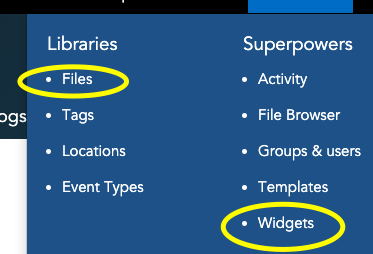
Additionally you may add downloadable content, which are called Files and so are edited in the Files Library (found in the Toolbox dropdown in the upper right of the Dashboard).
Manage forms in the Dashboard from the Forms tab. They are a simple way to interact with the public for opinions, sign-ups, etc. They can be embedded into other LiveWhale content like events or they can be viewed on their own URL.
- If you are adding a form, click Add a New Form; otherwise find and click on an existing form to edit
- Create or edit Fields for each of your form’s questions. Fields can be different types, including:
- single-line text field
- a multi-line text box
- checkboxes (for multiple responses)
- radio buttons (for limiting to a solitary response)
- a date/time selector
- When done, click Save this form. (And make it Live if it is ready for the public to see.)
When people compete your form, you can see their responses by clicking View submissions under the form title in the Manage Forms page.
Manage news stories in the Dashboard from the Stories tab.
- Click Add a New Story to add a new story item, or locate and click an exisiting news story to edit
- Fill out the form with the relevant information for your news story. A headline, summary, and story date are required.
- Click the Save this story button when you are finished. (And make it Live if it is ready for the public to see.)
Pages are managed in the Pages tab in the Dashboard.
- Make sure you are in the File Browser (rather than the Your Pages view).
- Navigate to the directory in which your new page should live. (Directories are the same as the /segments/ of a URL.)
- Once you’re in the directory where your new page should be, click on the Add a new page here link found in the righthand menu.
- On the Add Page screen, fill out the form to create a new page. Provide at least the title, assign the proper template, and then make sure it is Live.
- Additionally, you may specify:
- The Description field provides search engines with “meta” data that helps with search results.
- If you wish to receive a notification whenever this page is edited, check the box labeled Subscribe to notifications about changes to this page.
- If you want LiveWhale to periodically send editors a reminder to update this page, check the checkbox labeled Send editors a reminder to update this page. Choose the schedule option to be notified to update this page’s content from the drop-down select (weekly, monthly, yearly). After choosing a schedule option, choose the date to count from (for example, monthly from this Monday), as well as the users who should be notified. You may either choose all editors for this page to have the notification sent to all editors with access, or choose “an e-mail address” to specify a specific e-mail address to send to.
- To save the new page and return to the LiveWhale Dashboard, click Save this page.
Manage events in the Dashboard from the Events tab.
- Make sure you are in the group where your event should be created. (You can choose your group from your user account settings. A drop-down menu will appear allowing you to switch the group.)
- From the events manager, click the Add new button.
- Fill out the form with the relevant information for your event. At a minumum, have a title, a start date/time, and a description.
- Click the Save button when you are finished. (And Live if the content is ready for the public to see.)
Note: When editing repeating events, you will have the option to save changes to the entire series of events, change this and all following events in the series, or change only this event.
Widgets are a way to display and filter your LiveWhale content, and as such they are divided into the same types: news stories, events, profiles, and so on. (For example, you could embed a profiles widget on a page to display a list of alumni profiles you create. Or an events widget could display upcoming events.)
We have a large number of global widgets already made for you to embed in your pages, stories, events, etc. These can be found in the Insert menu (which is red) in the editing toolbar of all regular content.

If you wish to create/edit your own widgets (and know that the New Media team is happy to help with any widget work), the widget editor is found in Toolbox dropdown in the upper right of the Dashboard.